

Hiking & Traveling
Hiking Journal App
Discover the ultimate hiking companion with our all-in-one Hiking Journal Application. Capture and organize your unique hiking memories effortlessly while enjoying a personalized and shareable experience. Connect with a hiking community to share tips, experiences, and trails nearby.
Problem
In our dynamic world, the hiking community faces a challenge: the absence of a dedicated solution for creating, organizing, and sharing unique hiking memories. Hikers encounter difficulties in:
-
Creating new hiking memories in a personalized manner.
-
Recalling details of hiking adventures, such as explored places, trails, sightseeing overviews, their achievements, and meaningful connections.
-
Keeping hiking memories in one consolidated well-organized platform, which allows to easily relive memories or share them with family and friends.
-
Connecting with nearby hiking enthusiasts for valuable tips and advice.
-
Trusting Social Media with the personal data.
Goal
To address these challenges, the goal is to launch a new user-friendly platform facilitating:
-
hiking memory creation
-
private sharing
-
community connection
-
efficient tip exchange
This solution is designed to not only enhance the overall hiking experience but also nurture hiking community.
Personal project from scratch :)
Solution
Addresing the users' pain points I developed the all-in-one Hiking Journal Application, which effortlessly creates, organizes, and shares personalized hiking memories while fostering connections within the nearby hiking community.
1
Crafts personalized hiking memories effortlessly.
2
Organizes and structures hiking memories in folders or calendar view for easy retrieval.
3
Displays all hikes on a map, stores hiking maps, and provide navigation capabilities during hikes.

4
Helps to connect with the nearby hiking community for tips, advice.
5
Enable private and personalized sharing with friends, family, and the community.
6
Monitors personal hiking statistics and achievements over time, providing a chronological journey.
Designer's Role
-
UX researcher
-
UX designer
-
UI designer
Key App Features
1. Crafts personalized hiking memories
Problem:
'As a hiker I don't have any solution where I can create
my hiking memories in personalized way'
Feature solution:
User can create a new hike easily from 'New Hike' button
User can personalize memory with a template, people, personal story, quotes, music, etc


2. Organizes hikes in folders & in calendar
Problem:
'As a hiker I would like to keep my memories organized, structured and easily found.'
Feature Solution:
User can seamlessly go to 'My hikes' button or choose the hike in search engine.
User can open all hikes in a calendar view and search by years or months or go to Favorites.
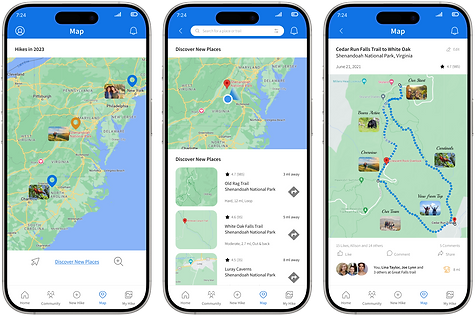
3. Uses navigation and map functions
Problem:
'As a hiker I would like to find my hikes on the map.'
'As a hiker I would like to see the map of the hike.'
'As a hiker I would like to be able to navigate during a hike.'
Feature Solution:
User can open any hike on the map with 'Map' button.
User can see any particular hike and its attractions on the map.
User can navigate during a hike.

4. Connects with the nearby hiking community
Problem:
'As a hiker I would like to connect with nearby hiking community for tips, recommendations.'
'As a hiker I would like to follow popular hikers.'
Feature Solution:
User can see other nearby hikers and thier suggested hikes when presses 'Community' button.
User can connect with or follow other hiker.
5. Enable private personalized sharing
Problem:
'As a hiker I would like to be able to share my hiking details, tips, observations fast and in personalized way.'
Feature Solution:
User can share any hiking experience and pictures seamlessly in a private personalized way.
User can share video collages with his family, friends.


6. Monitors personal stats & achievements
Problem:
'As a hiker I would like to keep track of my personal hiking statistics and achievments.'
Feature Solution:
User can monitor the personal statistics, goal completion and achievements in H-menu.
Process
01.
Empathize
Secondary Research
Competitive Research
User Interviews
Affinity maping
Empathy maps
Personas
JTBD
HMW Problem Statements
02.
Define & Ideate
User Stories
Site Map
User Flows
Sketches
Usability tests
Wireframes
Style Guide
High Fidelity Mockups
03.
Prototype & Test
Prototypes
Usability Tests
Iterations
Research Stage
Secondary Research
Key takeaways:
-
Hikers commonly utilize pictures, journals, sketches, and recordings to document and share their hiking memories, with a predominant preference for using their phones as the primary means of capturing these experiences.
-
Key data points hikers wish to keep include the hike's name, location, duration, length, difficulty, elevation, notable sightseeing places, encountered animals and birds, and essential comments for future reference.
-
There is a strong desire among hikers to connect with the nearby hiking community, seeking recommendations and tips for their future adventures.
Competitive research:
-
While navigation and trail apps like 'AllTrails' and 'Hiking Project' excel in guiding hikers, there is a noticeable gap in the market for an app specifically designed to create personalized memories and share them with close connections
-
Despite hikers' affinity for social media, many express a preference for personal apps to maintain privacy and create a more intimate, personal experience.

User Interviews
Research Design:
-
8 Semi-Structured User Interviews, online and offline
- TA: 25-50 yo, f/m, regular hikers
Key Takeaways:
-
Hikers currently lack a dedicated solution for creating, organizing, and sharing memories in a personal manner.
-
Connecting with the nearby hiking community proves to be a challenge for hikers.
-
Hikers frequently forget details about their hikes, including locations and sightseeing spots.
-
Sorting through overloaded photo albums poses a challenge when searching for specific pictures and memories.
-
Effortlessly sharing tips or hike recommendations when friends inquire is a common pain point.
-
Some hikers express a lack of trust in social media and prefer the inconvenience of sharing pictures via SMS.
-
The desire to relive hiking memories with family members is present, but current solutions are perceived as too complicated.
These insights highlight the need for a user-friendly solution that addresses these pain points, providing hikers with a seamless experience for creating, sharing, and
reliving their hiking memories.

Empathy Map - Katie H.
Pains:
-
She struggles to find the neccesary pics, details
-
She can't share the hikes memories with her friend
-
She can't relive her memories with friends & family
-
She can't find the same hike to repeat
-
She can't connect with hiking community for advice
Gains:
-
She wants to have a solution to create & keep memories in organized way
-
She wants to be able to share them easily with friends
-
She wants to connect with nearby hiking community
-
She wants to relive her past hikes with family members
-
She wants to have a personal touch in creating memories


Affinity Maps (several iterations)
The Affinity map analysis played a pivotal role in shaping the information system, app navigation, and understanding of user groups and their respective needs. Through this process, users' needs were categorized into four primary groups:
-
Creating Memories: This group emphasized the users' desire to document their experiences.
-
Keeping and Reliving them: Users expressed an inclination towards recalling memories and keeping them organized.
-
Sharing Memories: Social connectivity through shared experiences emerged as a significant need.
-
Community: The importance of interaction within the hiking enthusiast community was highlighted.
Additionally, secondary groupings included:
-
Personal Private Approach: Reflecting users' preference for individualized experiences.
-
Before and After Hike: Tips for Next Hikes
-
Competitors: Evaluation of existing platforms.
-
Future Solutions: Openness to innovative solutions such as virtual reality, AI, and AI matching people.
These insights served as the foundation for developing a user-centered UX solution.
User Persona
Creating personas was instrumental in several ways. Firstly, it helped me gain a deep understanding of the project's target audience by crafting representative characters based on real user data. This understanding allowed me to align the design and development process with the specific needs, goals, and behaviors of the users, ensuring that the portfolio effectively addressed their requirements.
Moreover, personas guided the prioritization of features and functionalities, enabling me to focus on elements that were most essential for enhancing the user experience. By empathizing with these personas, I was able to make design decisions throughout the project, resulting in a more intuitive and user-friendly platform.


HMW Problem Statements
-
How might we help hikers to create their personal hiking memories?
-
How might we help hikers to keep their hiking memories organized and easily found?
-
How might we help hikers to relive their experiences, memories, feelings after hiking?
-
How might we help hikers to share their experiences effortlessly?
-
How might we help hikers to be in touch with their hiking community for tips and recommendations?
-
How might we help hikers to personalize their hiking memories?
User Stories and User Flows
Following user interviews and market studies, I crafted user stories to emphasize essential features. These stories were translated into user flows, offering a visual roadmap for users to accomplish tasks effortlessly.
Key user stories for Hiking Application are:
-
As a User I can create a new hiking memory in a personalized unique way.
-
As a User I can keep my hiking memories organized and structured in albums and in calendar view.
-
As a User I can find all my hikes on the map, check map of the particular hike or navigate along a trail.
-
As a User I can connect with nearby hiking community.
-
As a User I can share my hiking memories in a personal way.
-
As a User I can track my hiking statistics and achievements.

Flow 1: As a user I would like to create a new hiking memory.

Flow 2: As a User I can keep my hiking memories organized in albums and in calendar.

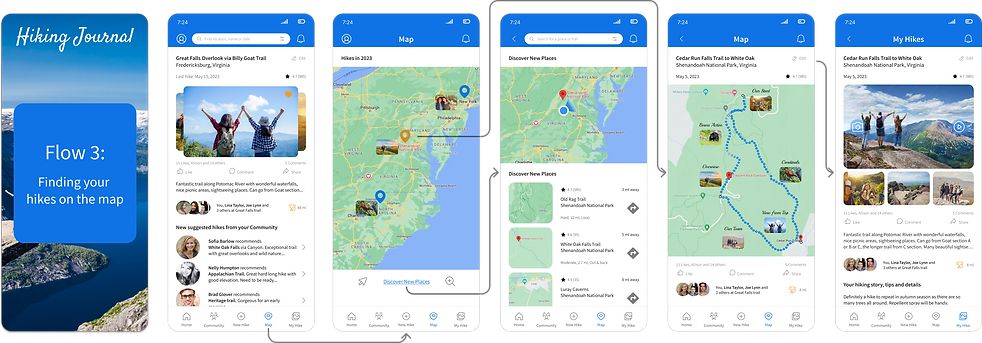
Flow 3: As a User I can find all my hikes on the map, check map of the particular hike or navigate along a trail.
Flow 4: As a User I can easily share my hikes with my friends and community.

Flow 5: As a User I can connect with nearby hiking community.

UI Style Guidelines

Usability Testing
Usability tests, 2 rounds, 10 people, A/B tests
TA: f/m, 25-50 yo, regular hikers
Key Improvements:
-
All issues were improved according to their priority, A/B tests were conducted for the most critical issues.
-
Several iterations with the folder 'My Hikes' were accomplished. In the final version users have two options: to find their hikes in Albums or Calendar view.
-
All links were done active, for example, for peoples' profiles, their hikes, suggested nearby hikes, etc.
-
Active buttons were improved.
-
A few important features were added like 'Personal Achievements' and 'Hiking Wish List'.
-
Community page: added share feature with all community.
-
Icons were improved to be better visible.

Improvements after Usability Tests
Imrovement 1: Home Page
To search for the current hikes in Calendar view was not clear for some users, it was changed to 'All Hikes' and later to 'My Hikes'.

Improvement 3: Home Page
Users said that they would like to track the achievements and share them with their friends.

Improvement 2: My Hikes Page
Users said that they want to find their hikes both in Albums and Calendar view with option to search in Calendar.

Improvement 4: Community Hikes Page
Users said that they would like to see what other hikers wrote about the suggested hike. Section with Reviews, Tips, Overlooks was added.

Conclusion
In summary, the research underscores the potential success of a Hiking Journal application, portraying it as a holistic solution to enriching the hiking experience. By prioritizing an intuitive design, seamless memory creation, private sharing capabilities, community integration and tip exchange, this platform promisses not only to elevate individual hiking experiences but also to cultivate a supportive hiking community. Embracing user feedback and consistently refining features will contribute to the continual enhancement of this user-friendly application.